THA BEAT CREATORS / SAUCERACK
SauceRack The Master Pro
EQ, dynamics, stereo shaping, clipping, limiting and loudness metering in one stereo mastering plugin.
Regular price: $49.99 USD
A complete stereo mastering workflow
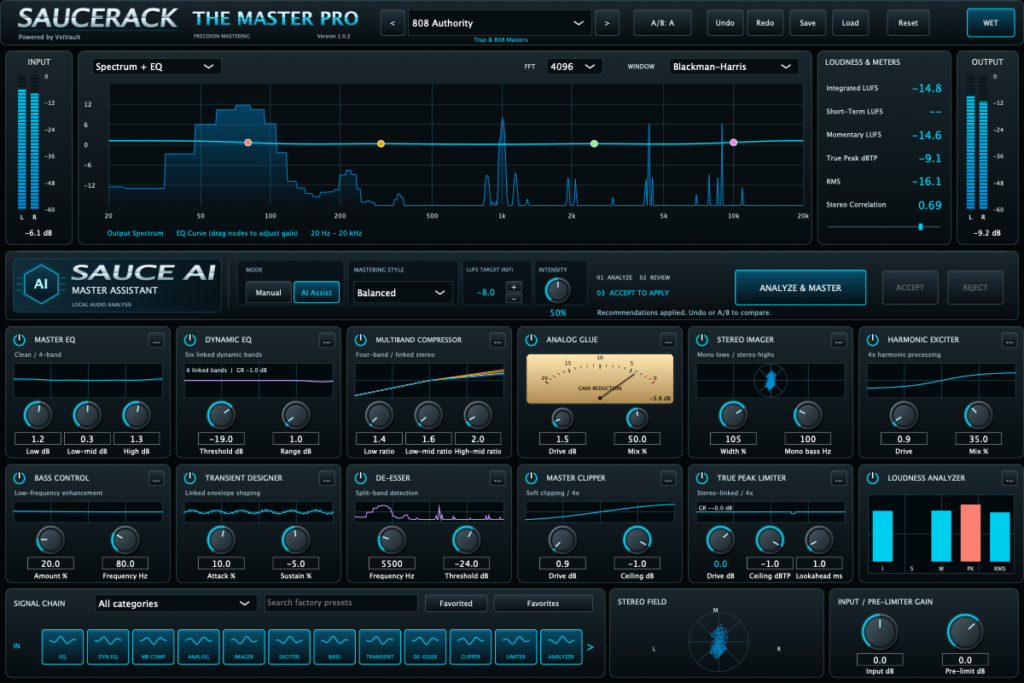
SauceRack The Master Pro brings EQ, dynamics, stereo shaping, harmonic color, clipping, limiting and loudness analysis into one plugin. Use it on a stereo master bus or a dedicated mastering track to develop your mix’s tonal balance, manage peaks and compare different finishing approaches.
Begin with one of 100 factory presets or build your chain manually. Sauce AI can suggest a starting point from your audio, while module switches, A/B settings, Undo/Redo and DRY/WET comparison keep the final decisions in your hands.
Eleven processing modules, one connected chain
Master EQ — broad tonal balance
Shape low-end weight, low-mid body, presence and air with a low shelf at 80 Hz, bells at 300 Hz and 2.5 kHz, and a high shelf at 10 kHz. Each band offers −18 to +18 dB of gain. The four graph nodes adjust gain; frequencies and filter shapes are fixed in this release.
Dynamic EQ — respond to changing emphasis
Six internal bands at 100, 300, 900, 2,500, 6,000 and 12,000 Hz respond when energy exceeds the shared threshold. Use Threshold to control when reduction begins and Range to limit its depth. This is linked dynamic control with shared parameters, rather than six independently editable EQ bands.
Multiband Compressor — control dynamics by region
Four linked-stereo bands split around 120 Hz, 1 kHz and 6 kHz. Set individual band ratios from 1:1 to 12:1, then adjust shared attack and release to explore how the processing responds to drums, bass and sustained content. The crossover transitions overlap and are not linear phase.
Analog Glue — blend compression and saturation
Combine linked bus compression with a nonlinear saturation path. Drive changes the level entering that path; Mix blends it with the incoming signal. Start with restrained settings when you want cohesion while retaining transient detail. The VU-style display shows gain reduction.
Stereo Imager — shape the stereo field
Adjust width from mono at 0% up to 150%, with 100% as the nominal width setting. Mono Bass reduces low-frequency side energy with a gradual transition adjustable from 20 to 300 Hz. Use the correlation meter and your DAW’s mono monitoring to judge the result.
Harmonic Exciter — add high-frequency color
A high-frequency nonlinear path adds harmonic texture above an internal 3 kHz split. Drive controls the nonlinear treatment and Mix controls its contribution. This is harmonic processing, rather than a simple treble shelf.
Bass Control — add low-frequency weight
Blend in a filtered low-frequency lift using Amount and a 30–200 Hz Frequency control. Explore added weight while watching the downstream clipper and limiter. Bass Control is not a subharmonic synthesizer or an automatic bass-normalization system.
Transient Designer — adjust attack and sustain
Use Attack and Sustain to emphasize or soften front edges and reshape the body of the mix. Both controls range from −100 to +100%. This envelope shaping operates on the complete stereo signal, not on isolated drum or vocal sources.
De-Esser — restrain excessive high-frequency energy
A linked split-band detector responds above the selected 2–16 kHz frequency region. Lower the Threshold to increase action, with internal reduction limited to 6 dB. On a full mix, cymbals and other bright sources can trigger the processing alongside vocal sibilance.
Master Clipper — shape peaks before final limiting
Explore soft clipping within the 4× oversampled processing chain, with up to 24 dB of Drive and an adjustable internal Ceiling. Use it to compare peak shaping and density against a limiter-only approach. The clipper’s ceiling does not establish the final reconstructed output peak.
True Peak Limiter — the final peak-control stage
Version 1.0.3 places the limiter after the oversampling output filter. Set a Ceiling from −12 to 0 dBTP and Lookahead from 0.1 to 10 ms, then adjust Drive gradually. Drive and the bottom Pre-limit control address the same gain parameter. DRY comparison and limiter bypass intentionally bypass ceiling protection, and downstream processing can change the delivered peak.
Sauce AI: analyze, review, accept
Play a representative section and choose Analyze & Master. The assistant captures ten seconds of aligned input and processed audio, measures loudness, peak and tonal-energy information, and proposes shelf-EQ and pre-limit gain changes. Analysis alone does not apply changes.
- Choose your style, target LUFS reference and Intensity.
- Keep audio playing through the ten-second analysis.
- Review the result, then choose Accept or Reject.
- Listen, compare and remeasure. Accepted changes can be undone.
Sauce AI runs locally using deterministic audio-analysis rules. It does not require a cloud AI service or use a trained model. Warm & Smooth modifies the high-shelf proposal; Balanced and Modern & Punchy share the base proposal logic in 1.0.3. The target is a reference for suggestions, not a promise of an exact LUFS result.
Metering that supports your decisions
- Integrated LUFS: gated loudness accumulated during playback.
- Short-term and momentary LUFS: three-second and 400 ms views of changing loudness.
- Estimated true peak, RMS and peak levels: observe output energy and peak behavior.
- Stereo correlation and stereo field: examine channel relationships while listening.
- Gain reduction: see how dynamics stages respond to your signal.
Select Spectrum + EQ, Spectrum or EQ curve views, FFT sizes from 1,024 to 8,192, and Hann or Blackman-Harris windows. These analyzer options change the visualization rather than the sound. Reset clears loudness measurement history; it does not reset processing settings. For a whole-song integrated reading, reset and play the complete intended program. Metering uses an approximation and is not a formal EBU certification claim.
100 factory presets and repeatable comparisons
Search the embedded factory library by name, category or description, mark favorites and navigate the filtered results. Presets provide starting points; adjust them to suit your material rather than assuming one preset completes every master.
A/B stores two settings banks. DRY/WET compares processing with the latency-matched original. Undo/Redo covers manual edits, module toggles, preset changes and accepted assistant suggestions; host automation uses your DAW’s automation history. Save editable .masterpro presets and the DAW session for recall. Automatic loudness matching is not documented, so use your DAW’s monitoring tools for similar-level comparisons.
A practical first session
- Insert Master Pro on a stereo bus and start with a mix that is not clipping upstream.
- Choose a factory starting point or disable unnecessary modules, then make small tonal adjustments.
- Use dynamic processing where needed, and compare each module’s contribution.
- Set your limiter ceiling and increase pre-limit gain only while the result remains suitable for your material.
- Compare A/B and DRY/WET, reset the meters, and measure the whole song.
- Save the preset and session, render through your DAW, then audition and independently measure the exported file when delivery specifications require it.
Know the signal path
Input → Master EQ → Dynamic EQ → Multiband Compressor → Analog Glue → Stereo Imager → Harmonic Exciter → Bass Control → Transient Designer → De-Esser → Master Clipper → Pre-limit Gain → True Peak Limiter.
The module order is fixed. Early processing runs at 4× oversampling; the final limiter follows downsampling. Master Pro reports processing latency for the host to compensate, so it is not a zero-latency monitoring effect.
What’s included with purchase
- Mac: native Apple Silicon AU and VST3 bundles, version 1.0.3.
- Windows: x64 VST3 bundle, version 1.0.3.
- Detailed PDF manual: 19 pages covering installation, processing, Sauce AI, presets, metering and troubleshooting.
- Factory library: 100 embedded presets, with no separate factory-library download required.
Download sizes: approximately 7.8 MB for Mac, 2.2 MB for Windows and 0.4 MB for the PDF. A compatible DAW is required and is sold separately.
Installation and compatibility
Quit your DAW and extract the package for your system. Keep each plugin bundle and its Contents folder intact.
- Mac VST3: copy to ~/Library/Audio/Plug-Ins/VST3/.
- Mac AU: copy to ~/Library/Audio/Plug-Ins/Components/.
- Windows VST3: copy the complete bundle to C:Program FilesCommon FilesVST3.
Restart or rescan the host, load Master Pro on a stereo track and confirm version 1.0.3 in the editor. The Mac package is native Apple Silicon, not an Intel/Apple Silicon universal binary. The Windows package is x64 VST3. A standalone application and installer are not included. Exact minimum macOS compatibility and DAW qualification need confirmation for the supplied release files.
Version 1.0.3 scope and current limitations
The supplied manual identifies the release as a development build. Full module reordering, freely editable eight-band EQ, independent six-band Dynamic EQ editing, reference-track matching, dither, selectable oversampling modes and a dedicated export engine are not implemented. Render through your DAW and use an independent meter when the destination requires a specified measurement standard.
Interface preview
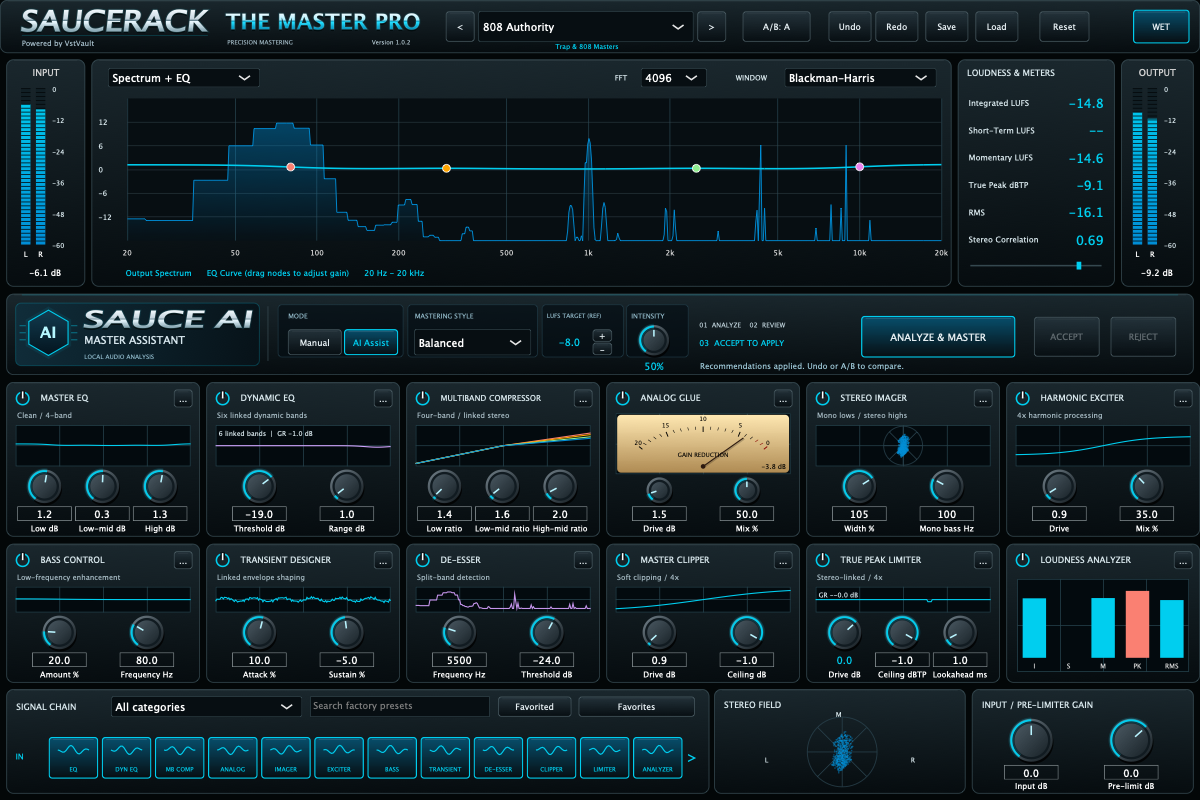
The supplied screenshot illustrates the version 1.0.2 interface. Purchase downloads and the included manual are version 1.0.3.
Current version
1.0.3
Related expansions
No products match these filters. Check back for new releases.