THA BEAT CREATORS / SAUCERACK
Sauce Comp 1500
Original VCA-style compressor with Modern/Vintage topology, Peak/RMS detection, parallel mixing and 100 factory presets.
Regular price: $49.00 USD
Control dynamics. Keep the groove.
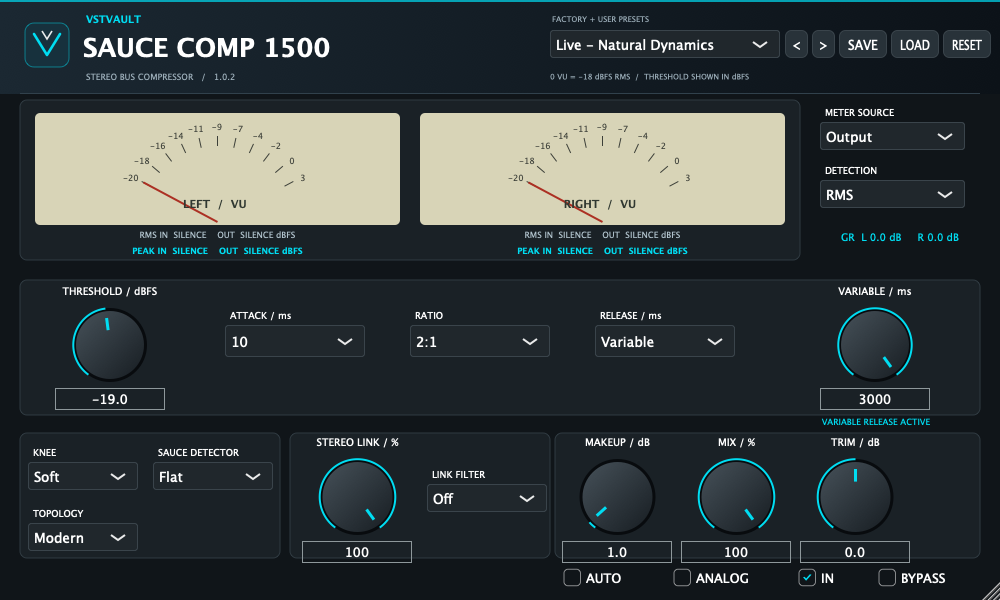
Sauce Comp 1500 is an original VCA-style dynamics compressor for individual tracks, stereo buses and parallel processing. Explore Modern feed-forward or Vintage feedback behavior, Peak or RMS detection, adjustable stereo linking and optional harmonic coloration in one focused workspace.
Start from one of 100 factory presets, or build your own settings using threshold, ratio, knee, attack and release. The stereo meters and gain-reduction readouts help you compare level and behavior while you listen.
Compression with a choice of response
Threshold, ratio and knee
Adjust the displayed threshold from −38 to +2 dBFS. Choose ratios of 1.5:1, 2:1, 3:1, 4:1, 6:1, 10:1 or INF:1, with Hard, Medium or Soft knee transitions. INF is a high-ratio approximation, not a lookahead output limiter.
Attack, release and Variable timing
Select attack times from 0.03 to 30 ms and fixed releases from 50 to 2,000 ms. For a custom recovery, use Variable Release from 50 to 3,000 ms. Editing the Variable knob selects Variable mode; for DAW automation, select that mode as well as automating its time.
Try slower attacks to retain more initial impact or faster attacks for tighter control. Timing behavior depends on the detector and program; the processor has no transient lookahead.
Modern and Vintage topology
Modern uses feed-forward detection from the input. Vintage responds to the previous compressed output sample with a normalized feedback integrator. The modes change compression behavior; Vintage is not simply an added-color switch.
Peak, RMS and Sauce Detector
Choose Peak detection for direct amplitude response or RMS for a smoothed average-energy response. Sauce Detector offers Flat, Punch and Presence control-path weighting. Punch reduces low-frequency influence; Presence makes the detector more sensitive to upper-frequency content. These shape the detector, not the audible program with a separate EQ.
Stereo control without crossfeeding the audio
Adjust Stereo Link from independent channel detection to fully shared control. The shared detector can use Off, High Pass, Low Pass or Band Pass link-filter settings. These change which frequencies influence the shared detector; they do not mix left audio into the right output.
Full linking is a useful starting point for a centered source or full mix. Compare lower link settings on wide material while listening for changes in the stereo image. The link filter has no meaningful shared-path contribution at 0% link.
Parallel compression, makeup and analog color
Blend compressed and latency-aligned dry audio with Mix. Manual Makeup adds gain to the wet signal, while Trim adjusts the combined output. Auto Makeup provides bounded, setting-based compensation; it does not measure or guarantee an exact live loudness match.
Analog enables an original soft-saturation stage after makeup. It is independent of Modern/Vintage topology and adds no modeled hiss or hum. Begin conservatively and compare at similar perceived level before deciding whether more drive improves your material.
100 presets and portable user settings
The embedded factory browser contains 100 presets. Use its menu or arrows to choose a starting point, then adjust the response for your recording. Save your own .sauce files with SAVE, restore them with LOAD, and save the DAW session for project recall.
RESET restores parameter defaults rather than loading the first factory preset. Sauce Comp 1500 and Sauce It Up presets are not interchangeable simply because both use a .sauce extension.
Read the meters by purpose
The dual VU meters are calibrated with 0 VU at −18 dBFS RMS. Select the meter source and use RMS, peak, gain-reduction and clip indications to separate compression from added output gain. These are not LUFS or reconstructed true-peak meters.
Makeup, Auto, Trim and a dry parallel contribution can produce peaks above 0 dBFS. Neither INF ratio nor Analog establishes a guaranteed output ceiling. Use a suitable downstream limiter when your workflow requires one.
A practical first session
- Insert the plugin on an audio track or bus, rather than an instrument slot.
- Press RESET. Begin with IN on, BYPASS off, Mix 100%, Auto and Analog off, and Makeup/Trim at 0 dB.
- Play a representative passage. Try 2:1, 10 ms attack and 200 ms release as an initial comparison point.
- Adjust threshold while watching gain reduction, then refine attack and recovery for the groove.
- Match the processed level with Makeup, compare using the plugin BYPASS and check output peaks.
- Save a user preset and the DAW session.
These are starting suggestions, not universal settings. Drum buses, vocals, bass and stereo mixes can respond very differently to the same detector and timing values.
Latency and signal path
The wet path uses fixed 2× linear-phase FIR oversampling and reports 49 samples of host latency—about 1.02 ms at 48 kHz. Dry and bypass signals use a matching delay. There is no oversampling selector or zero-latency switch. Let the DAW compensate reported latency during playback.
What’s included with purchase
- Mac: Sauce Comp 1500 version 1.0.2 AU and VST3 plugin bundles.
- Windows: version 1.0.2 x64 VST3 plugin bundle.
- User manual: detailed 25-page PDF, with control explanations, installation, workflows and the complete 100-preset settings index.
- Factory presets: 100 embedded settings, with no separate preset download needed.
Approximate downloads: Mac 15.3 MB, Windows 3.5 MB and manual 0.42 MB. The supplied archives contain plugin bundles; standalone applications and installer scripts described elsewhere in the manual are not included in these ZIPs.
Manual installation
- Quit the DAW and extract the archive for your platform. Preserve each plugin bundle and its internal folders.
- On Mac, copy SAUCE COMP 1500.vst3 to ~/Library/Audio/Plug-Ins/VST3/ and SAUCE COMP 1500.component to ~/Library/Audio/Plug-Ins/Components/.
- On Windows, copy the complete VST3 folder from the archive’s VST3 directory to C:Program FilesCommon FilesVST3.
- Restart or rescan the host and load the plugin as an audio effect. Confirm version 1.0.2 in the interface.
Compatibility and scope
Requires a compatible AU or VST3 host on Mac, or an x64 VST3 host on Windows. Supports mono/stereo compression. No AAX, VST2, external sidechain input, LUFS metering, reconstructed true-peak limiting or lookahead control is provided.
The manual reports automated Mac and Windows tests, including 100 preset states, but live sessions in specific DAWs and installer execution remain separate checks. Intel Mac execution and AU/Logic validation are not established by the documentation. Exact minimum operating-system compatibility needs confirmation for the supplied files.
Release and design notes
This is an original independent VCA-style design, with no Waves/API affiliation or exact-hardware-emulation claim. The documentation identifies locally ad-hoc-signed Mac and unsigned Windows evaluation builds. Use normal operating-system approval flows. Test saved sessions when replacing an older version: the 1.0.2 Auto Makeup behavior differs from 1.0.1.
Current version
1.0.2
Related expansions
No products match these filters. Check back for new releases.