THA BEAT CREATORS / SAUCERACK
Sauce It Up
Nine-module mixing channel strip with flexible routing, six-band EQ, dynamics, Sauce Color and 200 factory presets.
Regular price: $59.99 USD
Nine modules. One focused mixing workflow.
Sauce It Up is an audio-effect channel strip for vocals, drums, bass, instruments and mix buses. Bring gating, EQ, dynamics, harmonic shaping, de-essing, transient control, stereo processing, saturation and limiting into one connected workspace.
Choose from 200 embedded factory presets or start with Clean Start and enable only the modules you need. Compare alternate settings with A/B, adjust the global wet/dry Mix, and save portable .sauce presets alongside your DAW session.
Your complete channel-strip toolkit
Gate
Control low-level material before the rest of the chain. Gate stays at the input, giving you a consistent starting point before EQ and dynamics.
Six-band EQ
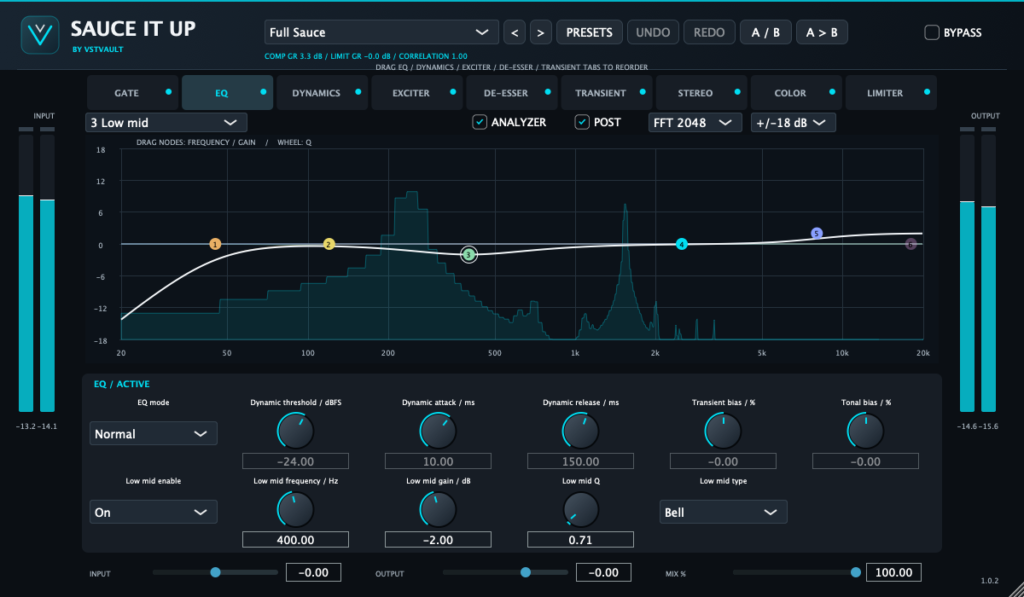
Edit bands from the graph and detailed controls. Drag nodes to change frequency and gain, and use the wheel for Q. Choose Normal EQ for consistent tonal changes, Dynamic EQ for level-dependent shelf/bell changes, or Transient/Tonal mode for envelope-dependent gain variation.
Dynamic mode uses shared threshold, attack and release controls. Transient/Tonal behavior estimates transient and sustained content; it is not source separation.
Dynamics
Choose compression or downward expansion, Peak or RMS detection, ratios up to 20:1, adjustable knee and timing, and manual or automatic makeup. Blend processing with the module Mix, set stereo linking, and reduce low-frequency detector influence with the internal sidechain high-pass filter. An external sidechain input is not provided.
Exciter
Explore low- and high-region harmonic treatments with separate crossover, Amount and Color controls. Blend the result with the module Mix, then compare at similar listening levels. The crossover regions are broad rather than steep, isolated multiband divisions.
De-Esser
Manage excessive sibilance and high-frequency emphasis as part of the same chain. Try it after the Exciter when you want it to react to added brightness, or change the order deliberately to hear the difference.
Transient
Reshape attack and sustained content on percussion, instruments or buses. Compare its placement before and after Dynamics to explore whether the compressor reacts to the reshaped transients or the transient stage follows compression.
Stereo
Adjust width, balance and mono presentation while watching correlation and listening for compatibility. Stereo stays after the reorderable middle modules.
Sauce Color
Add compensated soft saturation with Drive, Warmth, Tone, Mix and Compensation. This is an original nonlinear color stage, not an emulation of a named tape machine, and it does not add modeled tape hiss. Drive compensation follows the setting rather than measuring an exact loudness match.
Limiter
Control sample peaks at the end of the wet chain with Input Drive, Ceiling, Release and Lookahead. Keep global Mix at 100% when relying on wet-path ceiling control. Dry blends bypass that ceiling. This is sample-peak limiting, not a validated reconstructed true-peak limiter.
Change the order to change the response
Drag EQ, Dynamics, Exciter, De-Esser and Transient tabs to reorder those five middle stages. EQ before Dynamics changes what feeds the detector; EQ after Dynamics shapes the controlled result. Exciter and De-Esser order changes which stage reacts to the added harmonic content.
Gate remains first. Stereo, Color, Output gain and Limiter remain after the reorderable section. The processor fades the middle section during a routing change rather than switching it instantaneously.
200 presets, A/B and session recall
The 200 factory presets are embedded in the plugin. Use the preset arrows to browse them, save your own .sauce files from PRESETS, and recall settings with your DAW project. Factory presets include module states, processing values, gain, Mix, bypass and routing.
Use A/B snapshots for alternate settings and copy between banks when developing a variation. Undo and Redo support editing. Clean Start resets the controls and bypasses all nine modules, making it a useful starting point for a custom strip.
Practical starting points
- Vocals: begin with EQ, Dynamics and De-Esser, then add harmonic color only where useful.
- Drums: explore Dynamics and Transient together, comparing both possible processing orders.
- Bass and instruments: shape tonal balance before deciding how much dynamics or saturation is needed.
- Mix buses: enable only the stages that help the arrangement and compare at similar output loudness.
A highlighted tab selects the module; its small light controls whether processing is enabled. If you hear no change, check the module light, global bypass, global Mix and any module-specific Mix.
Oversampling, latency and monitoring
The wet engine uses fixed 2× FIR oversampling with a latency-aligned dry path. At 48 kHz, the documented latency is 529 samples, approximately 11.02 ms. The fixed delay remains when the limiter is off or the global bypass is active. Use normal host delay compensation; this is not a zero-latency monitoring strip.
The input and output meters, correlation display, spectrum analyzer and EQ graph help you assess changes. Confirm results by listening, and use an independent true-peak meter when final delivery requires reconstructed peak measurement.
What’s included with purchase
- Mac download: version 1.0.2 universal AU and VST3 plugin bundles containing Apple Silicon and Intel architectures.
- Windows download: version 1.0.2 x64 VST3 bundle. The supplied archive is named “Sauce It Up Mac Win x64.zip” but contains the Windows plugin.
- Complete PDF manual: 48 pages, including the 99-parameter reference and all 200 factory preset names.
- Factory library: 200 presets embedded in the plugin.
Approximate downloads: Mac 15.4 MB, Windows 3.6 MB, manual 0.24 MB. These supplied archives contain plugin bundles only; standalone applications and installer scripts mentioned in the broader manual are not included in these ZIPs.
Install on Mac
- Extract the Mac ZIP and quit your DAW.
- Copy the entire SAUCE IT UP.vst3 bundle to ~/Library/Audio/Plug-Ins/VST3/.
- Copy the entire SAUCE IT UP.component bundle to ~/Library/Audio/Plug-Ins/Components/ if you use Audio Units.
- Restart or rescan your DAW and insert Sauce It Up as an audio effect on a track or bus.
Install on Windows
- Extract the Windows x64 ZIP and quit your DAW.
- Copy the entire SAUCE IT UP.vst3 folder to C:Program FilesCommon FilesVST3.
- Keep Contents/x86_64-win and its plugin file intact.
- Restart or rescan the DAW, then load the VST3 on an audio track or bus.
Compatibility and release scope
Requires a compatible AU or VST3 host on Mac, or an x64 VST3 host on Windows. Processes mono or stereo audio with matching input/output layouts. It is not a synthesizer or MIDI instrument. AAX, VST2 and native Windows ARM64 are not supplied.
The manual reports Apple Silicon runtime checks and Windows automated plugin tests. Intel execution, AU/Logic loading and broad live-DAW qualification remain unverified. Exact minimum operating-system compatibility is not established here.
Important version 1.0.2 notes
The supplied documentation identifies evaluation binaries: Mac bundles use local ad-hoc signatures and are not Developer ID signed/notarized; Windows files are unsigned. Use the operating system’s normal approval process rather than disabling security protections. There is no external sidechain bus or selectable oversampling mode. Global dry blending can exceed the wet-path sample ceiling. The documented limiter does not guarantee reconstructed true-peak limits after resampling or encoding.
Current version
1.0.2
Related expansions
No products match these filters. Check back for new releases.