THA BEAT CREATORS / SAUCERACK
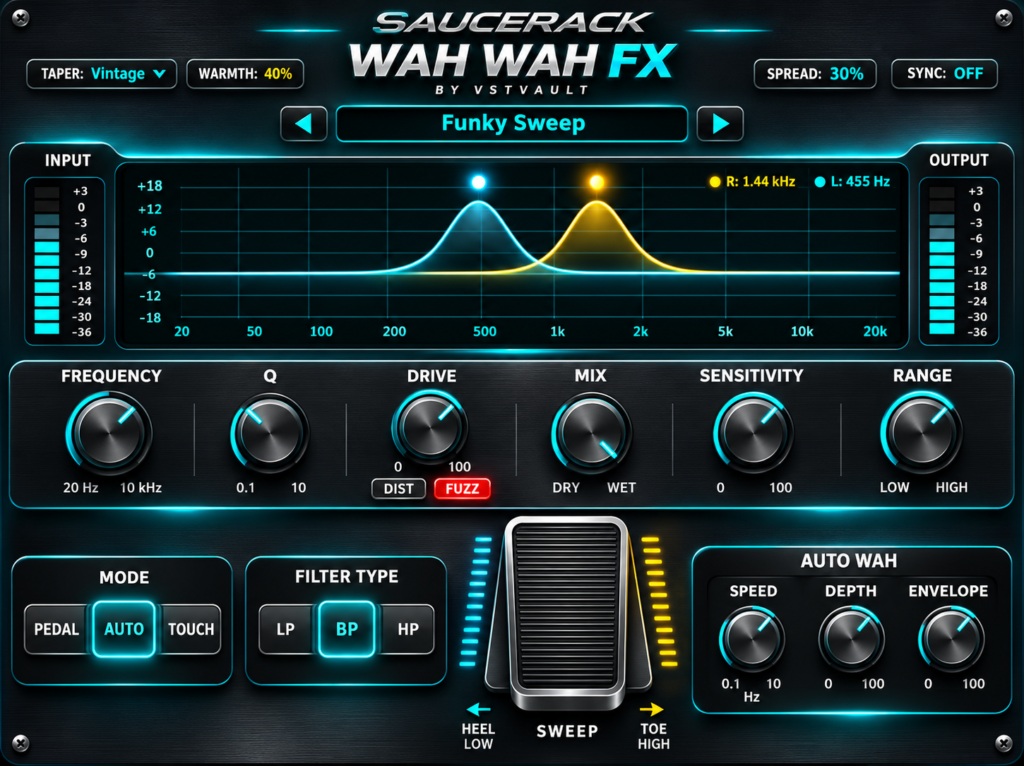
SauceRack Wah Wah Pedal
Expressive wah filtering with Pedal, Auto and Touch modes, three filter types, drive options and 75 factory presets.
Regular price: $29.00 USD
Expressive filtering. Manual sweeps. Rhythmic motion.
SauceRack Wah Wah Pedal brings a moving resonant filter to guitar, bass, keyboards, loops and other audio. Shape a phrase manually, explore repeating movement or use your playing dynamics to guide the response. The supplied interface artwork calls the product SauceRack Wah Wah FX; the plugin appears in your host as Saucerack Wah Wah Pedal.
Choose from 75 factory presets or build a sound with filter type, frequency, resonance, motion, drive and wet/dry controls. This is an audio effect for an existing source, not an instrument or a library of recorded guitar sounds.
Three ways to move the wah
Pedal — shape the phrase yourself
Move the on-screen treadle or automate Sweep through your DAW. Heel-to-toe movement spans the Sweep control’s 0–100% range. Hold a position for a stationary wah tone, then adjust Frequency and Range to explore the register and movement window.
Auto — add repeating movement
Explore cyclic motion using Speed and Depth. With Sync off, Speed ranges from 0.1 to 10 Hz. Turn on tempo sync for note-based timing, then choose a division that suits the phrase.
Touch — respond to playing dynamics
Use envelope-style movement with Sensitivity and Envelope controls. Compare quiet and stronger notes while adjusting the response, and experiment with compression before or after the wah to hear how the incoming dynamics influence the result.
Low-pass, band-pass and high-pass filtering
- LP: explore darker-to-brighter movement while retaining the lower region.
- BP: focus a band of frequencies as a starting point for a vocal-like wah character.
- HP: reduce lower content for thinner textures and transitions.
Frequency covers a 20 Hz–10 kHz reference range. Q controls resonance; the declared parameter supports 0.1–15 even though the supplied artwork labels the knob endpoint as 10. Sweep and modulation can move the live filter away from its reference frequency. High resonance can create strong peaks, so begin at a comfortable monitoring level.
Drive, warmth and stereo color
Choose Clean, DIST or FUZZ and adjust Drive from 0–100%. DIST and FUZZ provide alternative character choices; clicking the active drive-mode button returns to Clean. Mix blends original and processed audio.
Explore additional coloration with Warmth, and use Stereo Spread for intended left/right filter separation. Start Spread at 0% for a centered comparison and check wider settings in mono. Linear, Vintage and Aggressive taper choices let you explore different intended pedal-response feels.
The artwork’s analog character labels describe the interface’s intent; they are not a claim of verified hardware-circuit emulation.
Tempo sync and automation
Sync offers 1/1, 1/2, 1/4, 1/8, 1/16, 1/8T and 1/16T divisions. Begin in Auto mode with the DAW playing at a steady tempo, then compare straight and triplet options. Exact modulation phase/reset behavior and Windows standalone tempo handling have not been measured in the supplied documentation.
The 18 declared parameters are marked automatable. Use your DAW to record Sweep movements or adjust controls from its parameter view. A physical expression pedal requires compatible controller hardware and host mapping; a fixed MIDI CC or built-in MIDI Learn function is not established.
75 factory presets
Use the preset arrows or click the name to browse the supplied 75-entry bank. Explore manual wah, touch-driven bass, slow textures, rhythmic synth filtering and more. The included manual lists every preset and gives practical starting-point recipes.
Factory recall updates 12 main sound/motion parameters. Drive Mode, Sync, Sync Division, Pedal Taper, Stereo Spread and Warmth retain their current values. Set those explicitly for repeatable comparisons. Save your DAW project or use the host’s preset feature; the inspected interface does not provide a dedicated user-preset export button.
A useful first session
- Insert Wah Wah Pedal on a track or bus that already produces audio. For live guitar or bass, select the interface input and enable host monitoring.
- Lower monitoring level, choose Pedal and BP, and start with restrained resonance and drive.
- Move Sweep while the source plays. Position the tone with Frequency and adjust Q for focus.
- Try Auto for repeating movement or Touch for a dynamic response.
- Finish with Mix, Warmth, Drive and Spread, then compare using the host bypass.
- Save the session and reopen a short test project to confirm recall.
What’s included with purchase
- Mac ZIP: Apple Silicon AU and VST3 plugin bundles, version 0.1.0.
- Windows x64 ZIP: VST3 bundle and a separate standalone EXE.
- PDF manual: 14 pages covering installation, controls, workflows, parameter definitions and all 75 factory presets.
Approximate downloads: Mac 4.1 MB, Windows 6.6 MB and manual 3.1 MB. A guitar, audio interface and DAW are not included.
Mac installation and requirements
The supplied Mac binaries require Apple Silicon and declare macOS 26.0 minimum. No Intel binary or Mac standalone app is included. Use an architecture-compatible host.
- Quit your DAW and extract the Mac ZIP.
- Copy the entire Saucerack Wah Wah Pedal.component bundle to ~/Library/Audio/Plug-Ins/Components/ for AU.
- Copy the entire Saucerack Wah Wah Pedal.vst3 bundle to ~/Library/Audio/Plug-Ins/VST3/ for VST3.
- Reopen the host, rescan or validate, and search for Saucerack Wah Wah Pedal or VSTVAULT.
Windows installation
- Quit the DAW and extract the Windows x64 ZIP.
- Copy the entire Saucerack Wah Wah Pedal.vst3 folder to C:Program FilesCommon FilesVST3, preserving its internal Contents folder.
- Restart/rescan the host and insert it as an audio effect.
- The included EXE is a separate standalone application, not a file to place inside the VST3 folder. Its audio-device setup remains unverified.
Compatibility and documentation scope
Mac AU/VST3 and Windows x64 VST3 are supplied. AAX and Windows VST2 are not included. The minimum Windows version, measured CPU/latency, supported sample-rate matrix, licensing/activation behavior and notarization status are not established by the supplied materials.
The manual is based on package metadata, artwork and embedded interface/parameter definitions. It is not a record of live DAW installation or measured DSP behavior. The graph is an illustrative filter-shape display rather than a calibrated spectrum measurement. Installed visual styling may differ from the supplied artwork.
Current version
0.1.0
Related expansions
No products match these filters. Check back for new releases.